Day 30 Task: Kubernetes Architecture
Kubernetes Overview
With the widespread adoption of containers among organizations, Kubernetes, the container-centric management software, has become a standard to deploy and operate containerized applications and is one of the most important parts of DevOps.
Originally developed at Google and released as open-source in 2014. Kubernetes builds on 15 years of running Google's containerized workloads and the valuable contributions from the open-source community. Inspired by Google’s internal cluster management system, Borg,
Tasks
What is Kubernetes? Write in your own words and why do we call it k8s?
Kubernetes is a popular open-source platform that simplifies the management of containerized applications. It was originally developed by Google and is now maintained by the Cloud Native Computing Foundation (CNCF). Kubernetes automates the deployment, scaling, and management of containers, making it easier for developers to focus on building and delivering their applications.
The name "Kubernetes" comes from the Greek word for "helmsman" or "pilot", which reflects its role in steering and managing containerized applications. The name is commonly abbreviated as "k8s", where the 8 represents the number of letters between the "k" and the "s". This abbreviation is commonly used in command-line tools and documentation, making it easier to type and remember.
What are the benefits of using k8s?
There are several benefits of using Kubernetes (k8s) for managing containerized applications:
Scalability: Kubernetes enables you to scale your applications up or down based on demand, ensuring that your application can handle spikes in traffic or usage.
Portability: Kubernetes allows you to deploy your applications on any cloud platform or on-premises data center, providing flexibility and avoiding vendor lock-in.
High Availability: Kubernetes ensures that your applications are highly available by automatically restarting failed containers or moving them to healthy nodes.
Resource Optimization: Kubernetes optimizes resource utilization by placing containers on nodes based on resource availability and requirements, improving efficiency and reducing costs.
Automation: Kubernetes automates many tasks related to deploying, scaling, and managing applications, freeing up developers and operators to focus on other tasks.
Security: Kubernetes provides several security features, such as network isolation, authentication, and encryption, to help protect your applications and data.

Overall, Kubernetes provides a powerful set of tools for managing containerized applications, helping to improve scalability, portability, availability, resource utilization, automation, and security.
Explain the architecture of Kubernetes.
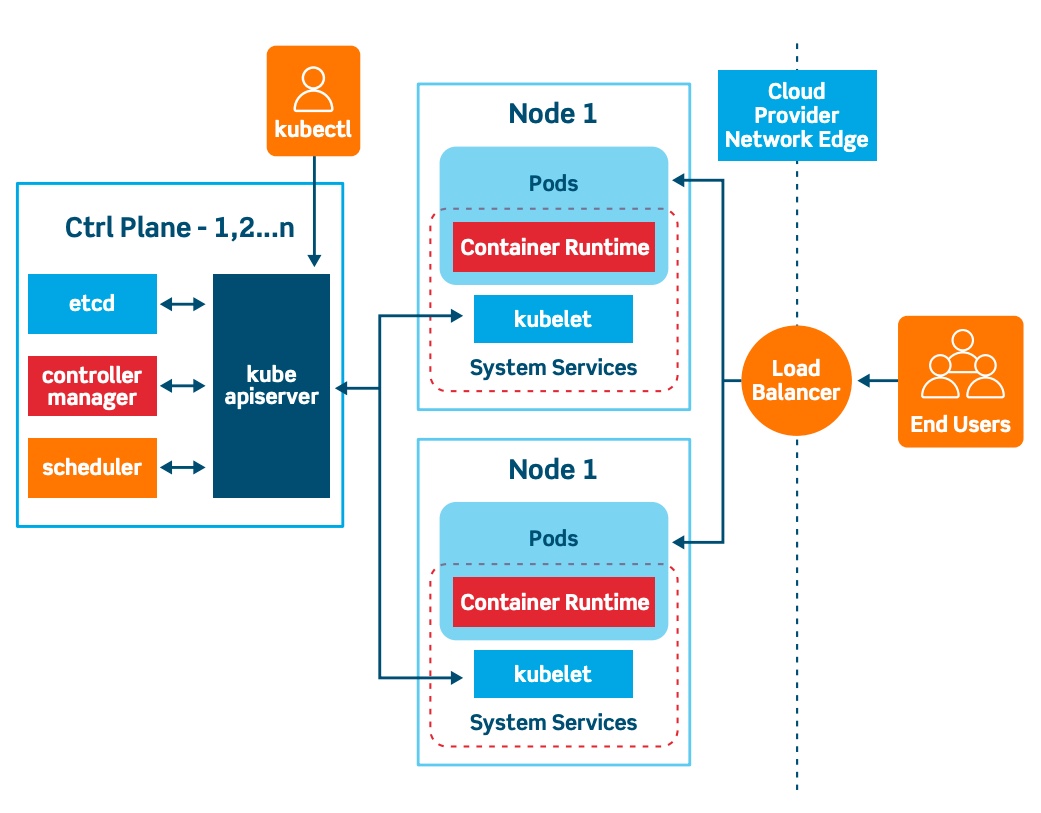
The architecture of Kubernetes can be divided into two main components: the Control Plane and the Nodes.
The Control Plane manages the Nodes and the containers running on them. It includes several components:
Kubernetes API Server: This component provides an interface for users to interact with the Kubernetes cluster, exposing the Kubernetes API. Users can use the API to manage the state of the cluster and to deploy, scale, and manage containerized applications.
etcd: etcd is a distributed key-value store that stores the configuration data for the entire cluster, including the state of the cluster, the configuration of each Node, and the desired state of each container.
Kubernetes Scheduler: This component is responsible for scheduling containers to run on Nodes based on resource requirements and availability. It evaluates the resource needs of each container and selects the best Node to run it on.
Kubernetes Controller Manager: This component manages various controllers that regulate the state of the cluster, such as the Replication Controller, which ensures that the desired number of replicas of a given pod is running.
The Nodes are the worker machines that run containerized applications. Each Node includes several components:
kubelet: This component runs on each Node and is responsible for communicating with the Kubernetes API Server to receive instructions on which containers to run.
kube-proxy: This component is responsible for managing network connectivity for the containers running on the Node.
Container Runtime: This is the software that runs the containers, such as Docker or rkt.
Here's a diagram that illustrates the architecture of Kubernetes:
What is Control Plane?
The Control Plane in Kubernetes is responsible for managing the overall state of the cluster. It includes several components that work together to ensure that the desired state of the system is maintained. These components include the Kubernetes API Server, etcd, Kubernetes Scheduler, and Kubernetes Controller Manager. The Control Plane components run on a set of dedicated machines in the cluster, called master nodes.
The Control Plane components communicate with each other via the Kubernetes API, which is exposed by the Kubernetes API Server. The API Server is responsible for receiving and processing requests from users and other components, and for updating the state of the cluster in etcd. The Kubernetes Scheduler is responsible for scheduling containers to run on the Nodes based on resource requirements and availability, and the Kubernetes Controller Manager manages various controllers that regulate the state of the cluster.
Write the difference between kubectl and kubelets.
Kubectl is a command-line tool that allows users to interact with the Kubernetes API to manage the state of the cluster. It is typically used by administrators or developers to deploy, scale, and manage containerized applications on the cluster.
kubelet, on the other hand, is a component that runs on each Node in the cluster and is responsible for communicating with the Kubernetes API Server to receive instructions on which containers to run. It ensures that the containers running on the Node are healthy and running as expected.
In summary, kubectl is used to manage the state of the cluster from a central location, while kubelet is responsible for managing the containers running on individual Nodes.
Explain the role of the API server.
The API Server is the central component of the Control Plane in Kubernetes. It provides an interface for users and other components to interact with the cluster, exposing the Kubernetes API. Users can use the API to manage the state of the cluster and to deploy, scale, and manage containerized applications.
The API Server receives requests from users and other components, and processes those requests to update the state of the cluster in etcd. It provides a uniform way for clients to access and manage resources in the cluster, and ensures that all components are aware of the current state of the system. The API Server is responsible for authentication and authorization, ensuring that only authorized users and components can access and modify resources in the cluster.
Happy Learning :)
Mohammed muqafamuddin
Comments
Join the discussionNo comments yet. Be the first to comment.